The MaxLength Attribute and MinLength Attribute allow us to specify the size of the column. Both these attributes are available in System.ComponentModel.DataAnnotations library. These attributes are similar to StringLength Attribute.
MaxLength Attribute
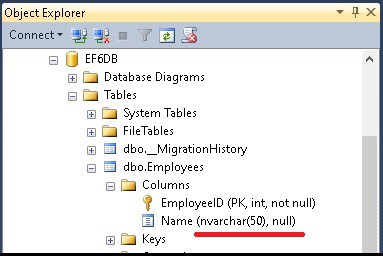
MaxLength attribute used to set the size of the database column. We can apply this attribute only to the string or array type properties of an entity. The following example shows how to use the MaxLength Attribute
  public class Employee
    {
        public int EmployeeID { get; set; }
        [MaxLength(50)]
        public string Name { get; set; }
    }
MinLength Attribute
MinLength attribute used to specify the minimum length of string or an array property. It is a validation attribute as it does not change the database schema. The following example shows how to use MinLength attribute
[MinLength(10)]
public string Address { get; set; }
MaxLength and MinLength attribute can be used together as shown below. In this example, Name cannot be greater than 50 characters and cannot be less than 10 characters
[MaxLength(50),MinLength(10)]
public string Name { get; set; }
You can customize the validation error message displayed to the user using the Error Message parameter of both MaxLength and MinLength attribute as shown below.
public class Customer
{
    public int CustomerID { get; set; }

    [MaxLength(50,ErrorMessage="Name cannot be greater than 50")]
    public string Name { get; set; }

    [MinLength(10, ErrorMessage = "Name cannot be less than 10")]
    public string Address { get; set; }
}
Entity framework will throw a validation error ( EntityValidationErrorMaxLength or size is less than a Minlength attribute.
StringLength Attribute
The Entity Framework also supports StringLength attribute, which is used by the ASP.NET MVC for validating the model.