
Apply the NotMapped attribute on those properties, which you do not want to include in your database table. This attribute usually used in the case of calculated fields like Age, Amount, etc.
Table of Contents
NotMapped Attribute
Entity Framework conventions create the table column for every public property which has getters & setters. This behavior can be overridden using the NotMapped attribute
This attribute is from the System.ComponentModel.DataAnnotations.Schema Namespace
In the following example, we have included age property. We can calculate the age property from the DOB Property. Hence no need to create the database column for the age property
public class Employee
{
  public int EmployeeID { get; set; }
  public string Name { get; set; }
  public DateTime DOB { get; set;}

  [NotMapped]
  public int Age { get; set; }
}
The above model maps to the database as shown below. Tne EF will not create the Age column in the database, because of the NotMapped attribute on the property. Without this attribute, the entity framework will create the column in the database
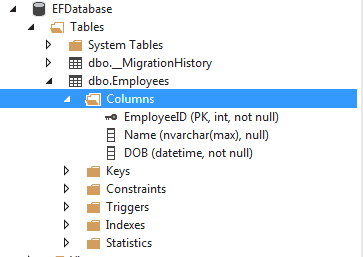
NotMapped Attribute on tables
You can also apply the NotMapped attribute on the class itself. This will exlcude the model from the database
[NotMapped]
public class Employee
{
  public int EmployeeID { get; set; }
  public string Name { get; set; }
  public DateTime DOB { get; set;}
}

how to do this data base first approach?