Time is the SQL Server data type that we use to store Time. It stores the time of a day, without time zone and using 24 hours format. It stores only the time without the date part.
Table of Contents
How SQL Server stores Time
Internally SQL Server stores time as an integer. It stores the number of clock ticks after midnight. Each clock tick is 1⁄10000000 of a second. The lowest unit of time that you can store is 0.0000001 second. If you try to assign any time less than 0.0000001 second, it will be rounded off. It displays the time in the format hh:mm:ss[.nnnnnnn].
Syntax
time([n])Where n is the number of digits for the fractional part of the seconds. The value of n is from 0 to 7. n is optional and defaults to 7
Choice of n defines the fractional part of the seconds. It also determines the bytes that it needs to store. Refer to the following table
| Data type | precision & scale | Storage Size (bytes) | Example |
|---|---|---|---|
| time *Default *Same as time(7) | 16,7 | 5 | 09:31:35.6170000 |
| time(0) | 8,0 | 3 | 09:31:36 |
| time(1) | 10,1 | 3 | 09:31:35.6 |
| time(2) | 11,2 | 3 | 09:31:35.62 |
| time(3) | 12.3 | 4 | 09:31:35.617 |
| time(4) | 13,4 | 4 | 09:31:35.6170 |
| time(5) | 14,5 | 5 | 09:31:35.61700 |
| time(6) | 15,6 | 5 | 09:31:35.617000 |
| time(7) | 16.7 | 5 | 09:31:35.6170000 |
Default Format
The SQL Server uses the 24 Hours format to display the time.
hh:mm:ss[.nnnnnnn]
Where
hhrepresents the hour from 00 to 23mmrepresents the minute from 00 to 59ssis the second from 00 to 59nnnnnnnis the fractional part of the seconds. No of the digits comes from the column definitiontime(n). Also, note it does not use milliseconds
Creating Time Column
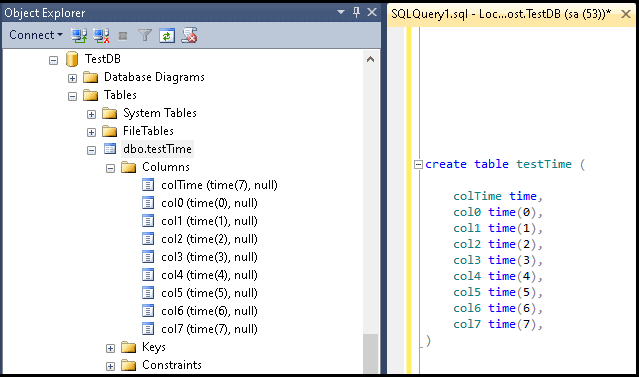
The following shows how to create a Time columns in a Table.
create table testTime (

	colTime time,
	col0 time(0),
	col1 time(1),
	col2 time(2),
	col3 time(3),
	col4 time(4),
	col5 time(5),
	col6 time(6),
	col7 time(7),
)
Inserting Values
The following insert query inserts the same time to all the time columns. We use the CURRENT_TIMESTAMP to get the current datetime. The CURRENT_TIMESTAMP function returns the current database system timestamp as a datetime value, without the database time zone offset.
insert into testTime (colTime, col0, col1, col2, col3, col4, col5, col6, col7 )
 values (CURRENT_TIMESTAMP,CURRENT_TIMESTAMP,CURRENT_TIMESTAMP,CURRENT_TIMESTAMP,CURRENT_TIMESTAMP,CURRENT_TIMESTAMP,CURRENT_TIMESTAMP,CURRENT_TIMESTAMP,CURRENT_TIMESTAMP)
colTime           col0      col1        col2        col3         col4
----------------  --------  ----------  ----------- ------------ -------------
09:31:35.6170000  09:31:36  09:31:35.6	09:31:35.62 09:31:35.617 09:31:35.6170

col5            col6            col7
--------------  --------------- ----------------
09:31:35.61700	09:31:35.617000	09:31:35.6170000
Time Formats
We can insert the time in the database columns in various formats
| Format string | Examples |
|---|---|
| hh:mm[:ss][.fractional seconds][AM][PM] | '09:30:30' '09:31:57.999' '09:31:57.9002640' |
| hh:mm[:ss][:fractional seconds][AM][PM] | '15:10:20:60' '09:31:57:999' |
| hhAM[PM] | '10:10AM' '10:10PM '15PM' |
Query Examples
insert into testTime (colTime) values ('15:10:20')

insert into testTime (colTime) values ('15:10:20.150')

insert into testTime (colTime) values ('15:10:20:15')

insert into testTime (colTime) values ('10:10AM')

insert into testTime (colTime) values ('10:10PM')

insert into testTime (colTime) values ('10AM')
Important Notes
- An hour value of 24 is not valid.
- Midnight is represented by either 12:00 AM or 00:00.
- Noon is represented by either
12:00or12:00 PM 00:mmrepresents the hour after midnight for example00:05,00:05AM00:05 PMis not a valid time. PM cannot be specified when the hour equals 0.- Milliseconds can be preceded by either a colon (:) or a period (.).
If a colon is used, the number means thousandths-of-a-second.
If a period is used, a single-digit means tenths-of-a-second, two digits mean hundredths-of-a-second, and so forth.
Reference
Read More