
Using Timestamp Attribute in Entity Framework Core is a way to handle the Concurrency issues. The Concurrency issue arises when multiple users attempt to update/delete the same row at the same time. This issue can be handled either by using the Timestamp column or ConcurrencyCheck attribute on the property. Timestamp columns are the preferred way of using for concurrency check.
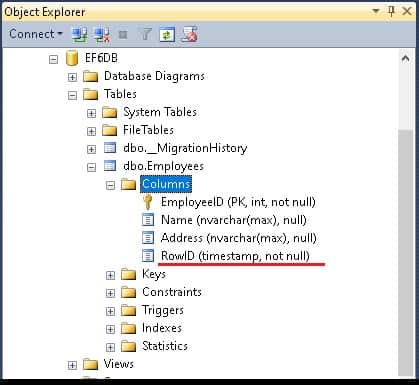
You can apply Timestamp attribute to any byte array column as shown in the entity model below. The Attribute is applied to RowID Property. The entity framework automatically adds the TimeStamp columns in update/delete queries. This attribute resides in the namespace system.componentmodel.dataannotations.schema
    public class Employee
    {
        public int EmployeeID { get; set; }
        public string Name { get; set; }
        public string Address { get; set; }
        [Timestamp]
        public byte[] RowID { get; set; }
     }
- We can apply
Timestampattribute to only one property in the domain model. - The data type of the
Timestampmust be abytearray - This attribute affects the database as it creates the column with datatype
rowversion.byte[]array withoutTimestampcreates thevarninary(max)column Timestampcolumns are the preferred way of using for concurrency check