The Discriminated unions or tagged unions are a pattern consisting of a common literal type property (Discriminant Property), Union types, Type aliases & Type guards.
Table of Contents
Discriminated Unions
The Discriminated unions are better explained using an example.
The Discriminated Unions consists of four ingredients
- A common Literal Type property or discriminant property
- Union Types
- Type Aliases
- Type Guards
Consider the example of Employees, Visitors & Contractors entering an office. We need to restrict Visitors from entering the restricted area while Employees & Contractors can. All of them share a common field name. We need to write a AllowRestrictedArea method which takes any of them as the argument, but must restrict only the visitors from entering the area.
Discriminant property
We start off by defining an interface for each of them as shown below. Apart from the name, which is common to all the interfaces, we have one more common property type. It is a property of type string literal type. The Type property in the Employee object can have only one value i.e "Employee" & nothing else. If you try to assign anything else, the compiler throws an error.
We add type property to all the interfaces and give it a unique value as Literal Type. This value helps us to identify the type of the object easily. This property also goes by the name Discriminant property or tagged property
interface Employee {
    type: "Employee"
    employeecode: number
    name:string
}

interface Visitor {
    type: "Visitor"
    visitorcode: number
    name:string
}

interface Contractor {
    type: "Contractor"
    contractorcode: number
    name:string
}
Union Types & Type Aliases
Next, we create a custom type using Type Aliases & Union Types. The type operator creates a Type Alias by the name Person, which is a union type of Employee, Visitor & Contractor
type Person = Employee | Visitor | ContractorType Guards
We pass the Person to AllowRestrictedArea method. If we try to access the employeecode property, the compiler throws an error and rightly so because Person can also be visitor or contactor, where there is no employeecode field.
function AllowRestrictedArea(person: Person): boolean {
    console.log(person.employeecode) //Property 'employeecode' does not exist on type 'Person'.
}
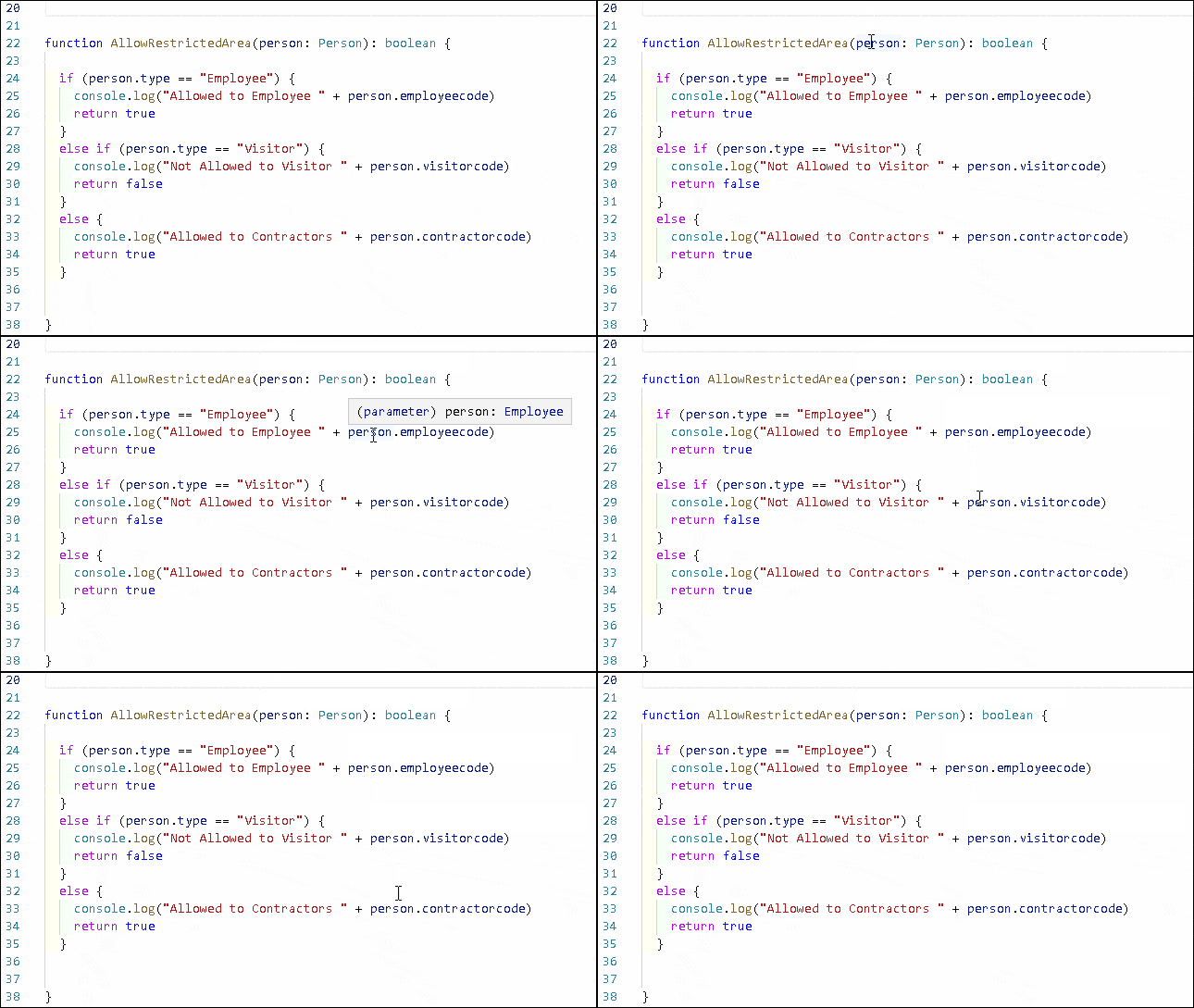
This is where the Type Guard comes into play. We use the if condition to check if he person is of type employee or not using the the person.type == "Employee"condition. If it is true then inside the if block the the person is treated as employee. The compiler errors disappear.
function AllowRestrictedArea(person:Person): boolean {

    //console.log(person.employeecode) //Property 'employeecode' does not exist on type 'Person'.

    if (person.type == "Employee") {
        console.log("Allowed to Employee " + person.employeecode)
        return true
    }
    else if (person.type == "Visitor") {
        console.log("Not Allowed to Visitor " + person.visitorcode)
        return false
    }
    else {
        console.log("Allowed to Contractors "+person.contractorcode)
        return true
    }
}
You can see it from the image below. Outside of the if block, the personis treated as Person, But inside the if block the person is treated correctly as per the property type.
The complete code
interface Employee {
    type: "Employee"
    employeecode: number
    name:string
}

interface Visitor {
    type: "Visitor"
    visitorcode: number
    name:string
}

interface Contractor {
    type: "Contractor"
    contractorcode: number
    name:string
}

type Person = Employee | Visitor | Contractor

function AllowRestrictedArea(person: Person): boolean {
    console.log(person.employeecode) //Property 'employeecode' does not exist on type 'Person'.
}


function AllowRestrictedArea(person:Person): boolean {


    //console.log(person.employeecode) //Property 'employeecode' does not exist on type 'Person'.

    if (person.type == "Employee") {
        console.log("Allowed to Employee " + person.employeecode)
        return true
    }
    else if (person.type == "Visitor") {
        console.log("Not Allowed to Visitor " + person.visitorcode)
        return false
    }
    else {
        console.log("Allowed to Contractors "+person.contractorcode)
        return true
    }
}


let employee:Employee = { type:"Employee", employeecode:1, name:"Rahul"}
AllowRestrictedArea(employee)

let vistor:Visitor = { type:"Visitor", visitorcode:1, name:"Sachin"}
AllowRestrictedArea(vistor)

let contractor:Contractor = { type:"Contractor", contractorcode:1, name:"Saurav"}
AllowRestrictedArea(contractor)

//OUTPUT
Allowed to Employee 1
VM393:12 Not Allowed to Visitor 1
VM393:16 Allowed to Contractors 1