
This tutorial explains how to set the page title using the title service in Angular apps using an example. The title service allows us the change the HTML title of the application with ease.
Table of Contents
Why change the page title
Changing the page title is very important as it helps search engines to know the purpose of the page and index it properly. It also helps users to know, which page they are in.
Being a single-page app, the angular does not reload the entire page. The page loads only once at the startup. Only part of the page gets loaded when you navigate from one route to another.
The title of the page is set in the index.html as shown below. We use the HTML title tag to set the title of the app. Since it is loaded only at the start, all other pages or routes get the same title.
<!doctype html>
<html lang="en">
<head>
  <meta charset="utf-8">
  <title>Title Service Example</title>
  <base href="/">
  <meta name="viewport" content="width=device-width, initial-scale=1">
  <link rel="icon" type="image/x-icon" href="favicon.ico">
</head>
<body>
  <app-root></app-root>
</body>
</html>
Title Service in Angular
We can make use of the title service in angular to make changes to the document title
How to Use Title Service
Import it in the Angular Module
import { BrowserModule, Title } from '@angular/platform-browser';Note that the title service is part of the platform-browser package. i.e because the title meta tag is applicable to the HTML page in the browser.
If you are using any other platform like NativeScript for mobile apps, you need a different service. The service, which understands the platform.
Register the service with DI Providers
Like all other Angular services, we need to register the title service with the Angular Providers in the root Angular module.
@NgModule({
  declarations: [
  ],
  imports: [
    BrowserModule,
  ],
  providers: [
    Title                   //Register the Service
  ],
  bootstrap: [AppComponent]
})
export class AppModule { }
Inject Title service in the component
Inject the title service, like all other Angular Services in the component using Dependency Injection
export class TitleComponent implements OnInit {
  constructor(private title:Title) { }
}
The title service provides only two methods. SetTitle & GetTitle. We use SetTitle to set the title of the page and GetTitle to find out the current title of the page.
Use the setTitle method to set the title
ngOnInit() {
   this.title.setTitle("How to use title service in Angular")
}
That’s it.
Title service example
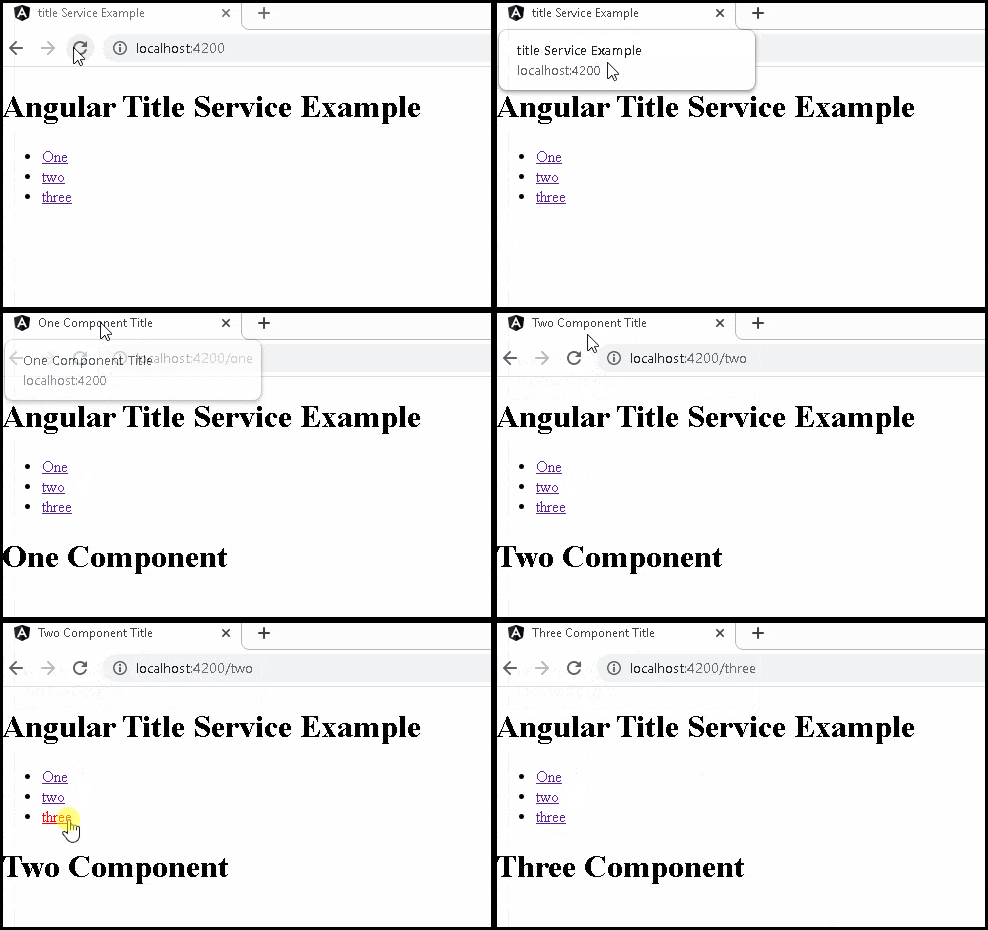
The following is the example app, which has three components. Each component uses the setTitle method of the Title service to set the title of each component.
app.module.ts
import { BrowserModule, Title } from '@angular/platform-browser';
import { NgModule } from '@angular/core';

import { AppRoutingModule } from './app-routing.module';
import { AppComponent } from './app.component';
import { OneComponent } from './one.component';
import { TwoComponent } from './two-component';
import { ThreeComponent } from './three.component';

@NgModule({
  declarations: [
    AppComponent,OneComponent,TwoComponent,ThreeComponent
  ],
  imports: [
    BrowserModule,
    AppRoutingModule
  ],
  providers: [Title],
  bootstrap: [AppComponent]
})
export class AppModule { }
app-routing.module.ts
import { NgModule } from '@angular/core';
import { Routes, RouterModule } from '@angular/router';
import { OneComponent } from './one.component';
import { TwoComponent } from './two-component';
import { ThreeComponent } from './three.component';


const routes: Routes = [
  {path: 'one', component:OneComponent},
  {path: 'two', component:TwoComponent},
  {path: 'three', component:ThreeComponent},
];

@NgModule({
  imports: [RouterModule.forRoot(routes)],
  exports: [RouterModule]
})
export class AppRoutingModule { }
app.component.ts
import { Component } from '@angular/core';
import { Title } from '@angular/platform-browser';

@Component({
  selector: 'app-root',
  templateUrl: './app.component.html',
  styleUrls: ['./app.component.css']
})
export class AppComponent {
  title = 'title Service Example';

  constructor(private titleService:Title) {
  }

  ngOnInit() {
    this.titleService.setTitle(this.title);
  }
}
app.component.html
<h1>Angular Title Service Example</h1>

<ul>
  <li><a [routerLink]="['/one']">One</a> </li>
  <li><a [routerLink]="['/two']">two</a> </li>
  <li><a [routerLink]="['/three']">three</a> </li>
</ul>

<router-outlet></router-outlet>
one.component.ts
@Component({
  template: `<h1>One Component</h1>`
})
export class OneComponent implements OnInit {
  title = 'One Component Title';

  constructor(private titleService:Title){
  }

  ngOnInit() {
    this.titleService.setTitle(this.title);
  }

}
two.component.ts
import { Component, OnInit } from '@angular/core';
import { Title } from '@angular/platform-browser';

@Component({
  template: `<h1>Two Component</h1>`
})
export class TwoComponent implements OnInit {
  title = 'Two Component Title';

  constructor(private titleService:Title) {
  }

  ngOnInit() {
    this.titleService.setTitle(this.title);
  }

}
three.component.ts
import { Component, OnInit } from '@angular/core';
import { Title } from '@angular/platform-browser';

@Component({
  template: `<h1>Three Component</h1>`
})
export class ThreeComponent implements OnInit {
  title = 'Three Component Title';

  constructor(private titleService:Title){}

  ngOnInit() {
    this.titleService.setTitle(this.title);
  }
}
References
Summary
We learned how to make use of the Title service in Angular

Awesome, thank you!
Awesome tutorial, congrats!!
best introductory material on angular.
very impressed.
very helpful. nicely explained.
Finally the first example I have found that fully explains using the Title Service. Thank you!
This Tutorial is very simple and understandable please make more on rxjs concepts
Straight forward tutorials, excellent examples
I really like this one also wanted to know how to master angular, what is the edge of it you know …
After spending weeks, all I found was learning rxjs and basic concepts and yet I see tutorials like this … 🙂
This is a very nice tutorial. The examples are clear, and they work as advertised. Thank you for taking the time to post it!