
In this article, we will explore the differences between inner & outer join in SQL Server. The join statement in the SQL server is used to join data from two or more tables. There are a few different types of joins in SQL Server. Understanding the difference between them is very crucial in writing better SQL Querries
Table of Contents
Differences between inner join & outer join
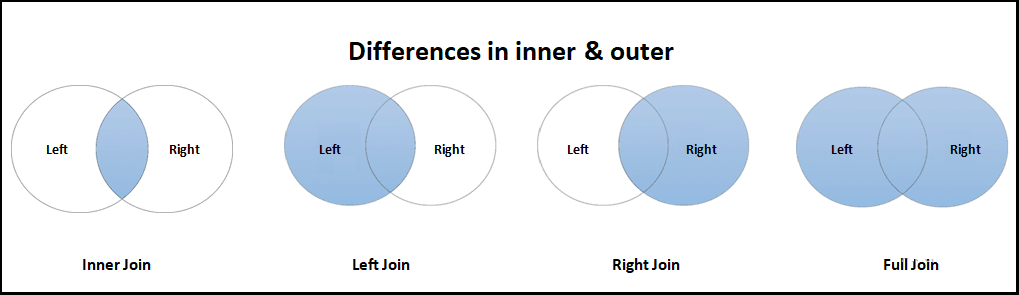
The following Venn diagram clearly shows the difference between each join type. There are three kinds of joins in SQL Server, inner, outer and cross. The outer join is further divided as left, right & full.
INNER JOIN: Returns only matched rows
LEFT JOIN: Return all rows from the left table, and the matched rows from the right table
RIGHT JOIN: Return all rows from the right table, and the matched rows from the left table
FULL JOIN: Return all rows from both the tables
| Inner | Left Outer | Right Outer | Full Outer | |
|---|---|---|---|---|
| Matching Rows | Yes | Yes | Yes | Yes |
| Left Table | No | Yes | No | Yes |
| Right Table | No | No | Yes | Yes |
| Join Order of the tables | Does not matter | does matter | does matter | Does not matter |
Example
Let us compare the result of all the join types side by side.
Sample Database
create table customerType (
	CustomerTypeID int primary key,
	Name varchar(10)
)

insert into customerType values (1,'Patron')
insert into customerType values (2,'VIP')
insert into customerType values (3,'Regular')


create table Customers (
   CustomerID int primary key,
   Name varchar(100),
   CustomerTypeID int null,
   CONSTRAINT FK_Customers_CustomerTypeID FOREIGN KEY (CustomerTypeID)
      REFERENCES customerType (CustomerTypeID)
);

insert into Customers values(1, 'Kevin Costner',1);
insert into Customers values(2, 'Akshay Kumar',2);
insert into Customers values(3, 'Sean Connery',1);
insert into Customers values(4, 'Sanjay Dutt',2);
insert into Customers values(5, 'Sharukh Khan',null);


create table Orders (
   OrderNo int primary key,
   OrderDate datetime,
   CustomerID int null,
   Amount decimal(10,2),
   CONSTRAINT FK_Orders_CustomerID FOREIGN KEY (CustomerID)
      REFERENCES Customers (CustomerID)
);

insert into Orders Values(1,'2019-12-10',1,5000)
insert into Orders Values(2,'2019-12-09',1,3000)
insert into Orders Values(3,'2019-12-10',2,7000)
insert into Orders Values(4,'2019-12-01',2,7000)
insert into Orders Values(8,'2019-12-10',2,4000)
insert into Orders Values(5,'2019-12-10',3,1000)
insert into Orders Values(6,'2019-12-03',3,1000)
insert into Orders Values(7,'2019-12-10',4,3000)
Join Query
Inner Join
select c.name, t.name as customerType
from customers c
join customerType t
on (c.custmerTypeid=t.customerTypeid)
Left Join
select c.name, t.name as customerType
from customers c
join customerType t
on (c.custmerTypeid=t.customerTypeid)
Right Join
select c.name, t.name as customerType
from customers c
right join customerType t
on (c.custmerTypeid=t.customerTypeid)
Full Join
select c.name, t.name as customerType
from customers c
full join customerType t
on (c.custmerTypeid=t.customerTypeid)
Query Result

From the above, you can see the difference in each result. All Query results include the matching rows. The left join has all the rows from the customer table & right join has all the rows from the customer type table. While full join has all the rows from both the tables.
Join Order of tables
Now, you move the CustomerType table to the from clause and the Customers table to the join clause. The result of inner and full join does not change, while that of left and right changes. In fact, the result of left join and right join gets exchanged.

Join Order in more than 3 tables
The following is more than 3 tables joined using only inner join. The result of both the queries are the same
select c.name, t.name as customerType, o.OrderDate, o.Amount
from customers c
join customerType t
on (c.customerTypeid=t.customerTypeid)
join Orders o
on (o.CustomerID=c.CustomerID)

Or
select c.name, t.name as customerType, o.OrderDate, o.Amount
from Orders o
join Customers c
on (o.CustomerID=c.CustomerID)
join customerType t
on (c.customerTypeid=t.customerTypeid)
Similarly, the full join also results in the same result.
While left & right produce different results as you change the join order of tables.
References
Read More
- SQL Server Tutorial
- SQL Join in SQL Server
- Join Types in SQL Server
- Inner Join in SQL Server
- Left Join in SQL Server
- Right Join in SQL Server
- Full Join in SQL Server
- Cross Join in SQL Server
- Self Join in SQL Server
- Difference between inner and outer joins (left, right and full)
Summary
We learned the difference between inner & outer joins like left, right & full join with example. Understanding the difference between joins is crucial in writing better queries in SQL Server.


There is currently no difference in the queries between the inner join and the left join…