A Typescript variable is a storage for the data, where programs can store value or information. We must give a name to the variable. We can then refer the variable in another part of the program. In this article, we learn how to declare a variable. Also, learn about the rules for naming the variable.
Table of Contents
Declaring the variable
We need to declare the variables before using them. We use let, var or const keyword to declare the variable.
The following example declares the variable using the keyword var. You can as well use let & const here
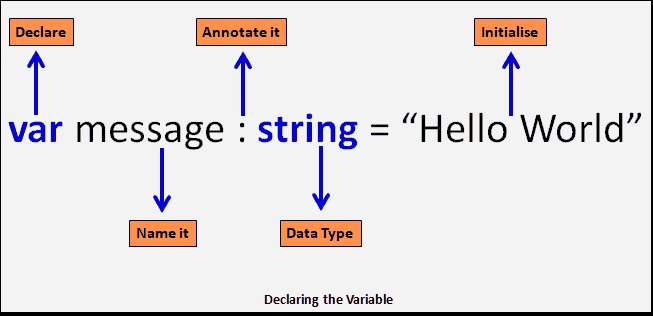
var message: string = "Hello World" We name the variable as the message. The name message uniquely identifies this variable. Hence, It is also called an Identifier. It should follow the identifier naming rules mentioned in the next tutorial.
We are declaring that the message will store only the string. We do that using : type annotation syntax i.e :[Type], where Type is the name of the Typescript data type. The type can be number, string, boolean, etc.
We are storing the literal “Hello World” by using the = operator. It is an Assignment operator. It Assigns values from the right side operand (i.e =) to the left side operand.
Naming the Variable
We must follow these rules when naming the variable. For a more detailed description please read identifiers & keywords in typescript.
- Variable name must be unique within the scope.
- The first letter of a variable should be an upper case letter, Lower case letter, underscore or a dollar sign
- Subsequent letters of a variable can have upper case letter, Lower case letter, underscore, dollar sign, or a numeric digit
- They cannot be keywords.
- Identifiers are case-sensitive.
- They cannot contain spaces.
Variable Declaration syntax
We can declare the variables in four different ways.
- both type and initial value
- only the type
- only the initial value
- without type and initial value
Both type and Initial value
Here, we define both the type and initial value of the variable.
Syntax:

let  [Indentifier] : [type-annotation]  = value ;
var  [Indentifier] : [type-annotation]  = value ;
const [Indentifier] : [type-annotation]  = value ;
Example:
var message: string = "Hello World"
var num: number =1000;

console.log(message);
console.log(num);
Output
Hello World
1000
Only the type
Only the type is declared. Variable will get the value undefined. The const is not allowed here
Syntax:

let  [Indentifier] : [type-annotation];
var  [Indentifier] : [type-annotation];
//const is not allowed without an initial value
Example:
var message: string
var num: number

console.log(message);    //will print undefined as no value is assigned
console.log(num);

message="Hello World"
num=1000;

console.log(message);
console.log(num);
output
undefined
undefined

Hello World
1000
only the initial value
Here, the variables are defined without type, but with an initial value. The Typescript infers the type from the value assigned to it.
Syntax

let  [Indentifier] = value;
var  [Indentifier] = value;
const  [Indentifier] = value;
In the example below, we have not declared the type but initialized message & num variable using a value. Typescript infers the type of the variable from the value assigned to it. Hence the variable message is created as string variable and num as number
Example :
var message = "Hello World"    //Typescript infers the type as string becasue assigned value is string
var num =1000;                 //num is a number because 100 is assigned to it

console.log(message);
console.log(num);


message = num;    // this will result in compile error
output
Hello World
1000
Without type and initial value
Here neither the type nor the initial value is given. In this case, the compiler infers the type as any. The const keyword not allowed here.
Syntax

let  [Indentifier];       //type is assumes the type as any.
var  [Indentifier];       //type is assumes the type as any.
//const is not allowed without an initial value.
Example :
var message
var num

message = "Hello World"
num =1000;

console.log(message);
console.log(num);
output
Hello World
1000
Summary
We use let or var keyword to declare a variable. The variables are annotated using the colon :, which is optional. We can optionally initialize the variable using the assignment operator. If you do not annotate a variable or did not initialize with a value, then typescript will infer it as type any.